

Retro Halftone Brushes Guidelines
Customer's How to Install & Use Guide
Retro Halftone Procreate Brushes

Step 1
Locate and open the downloaded files named:
BA-Halftone-Creative-Brushes.brushset
BA-Halftone-Dot-Brushes.brushset
BA-Halftone-Invert-Brushes.brushset
BA-Halftone-Line-Brushes.brushset
BA-Ink-Brushes.brushset
In the contextual menu choose and press Share button.

Step 2
In the contextual menu choose and press Open in Procreate button.
Step 3
Locate and open in Procreate the downloaded files named:
BA_Palette_1.swatches
BA_Palette_2.swatches
BA_Palette_3.swatches
BA_Palette_4.swatches
In the contextual menu choose and press Share button.
Package also includes 2 high-resolution paper textures in JPG format.
Retro Halftone Photoshop Brushes
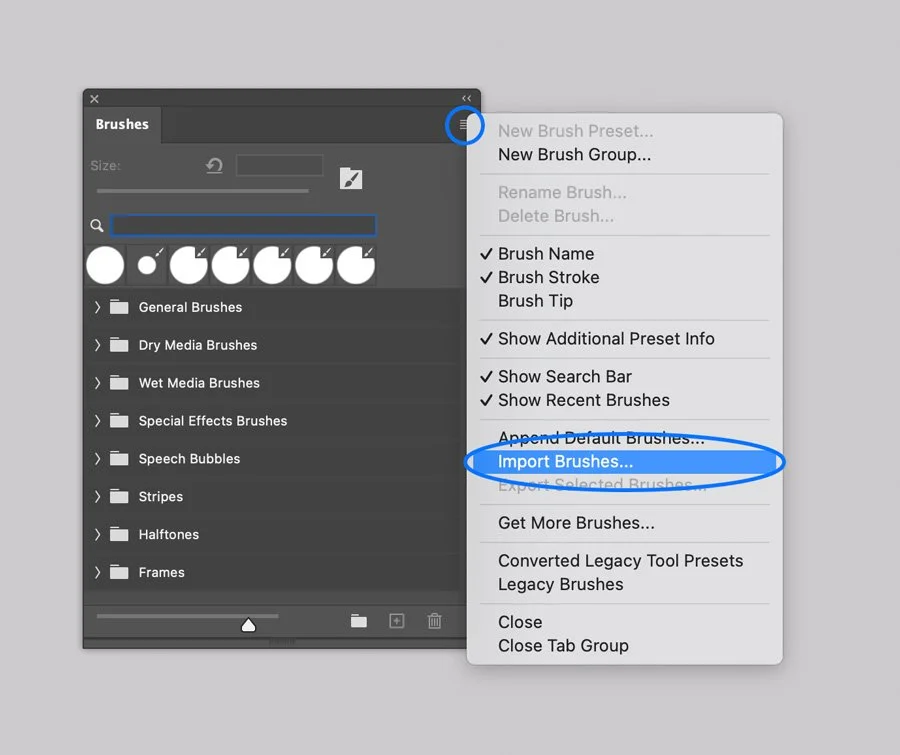
Step 1
In Adobe Photoshop, Open the Brushes panel (Window > Brushes).
Click the panel's upper right corner button to open drop-down menu.
Step 2
Select the Import Brushes option from the menu and browse the files named:
BA-Classic-Halftone-Dot-Brushes.abr
BA-Classic-Halftone-Line-Brushes.abr
BA-Halftone-Creative-Brushes.abr
BA-Halftone-Invert-Creative-Brushes.abr
BA-Ink-Brushes.abr

Step 3
In Adobe Photoshop, Open the Swatches panel (Window > Swatches).
Click the panel's upper right corner button to open drop-down menu.
Select the Import Swatches option from the menu and browse the files named:
BA Palette 1.aco
BA Palette 2.aco
BA Palette 3.aco
BA Palette 4.aco
Package also includes 2 high-resolution paper textures in JPG format.
Retro Halftone Illustrator Brushes

Step 1
In Adobe Illustrator, open the Brushes panel (Window > Brushes, or F5).
Step 2
Open the Brush Libraries Menu in the bottom left of the Panel (the bookshelf icon).
Step 3
Select the Other Library option and browse the BA-Ink-Brushes.ai file.

Step 4
Retro halftones come as AI Swatches. Open the Swatches panel (Window > Swatches). Select the Other Library option and browse files:
BA-Halftone-Classic-Dot-Patterns.ai
BA-Halftone-Classic-Line-Patterns.ai
BA-Halftone-Creative-Patterns.ai
BA-Halftone-Invert-Patterns.ai
Color palettes are also included as an AI swatch. Once again, select the Other Library option and browse files: Palettes.ai
Package also includes 2 high-resolution paper textures in JPG format.


Drawing with the Brushes
Select the Brush Tool from the Tools Menu (B).
Select one of the brushes on the Brushes Tab by clicking on it.
Draw a line.


Or, you can apply brushes to existing paths and shapes:
Select an existing line or vector shape with Selection tool (V).
Select one of the brush icons on the Panel, and it will be applied to your line.
Adjust the render by changing Stroke thickness in the Appearance panel.
Next, select one of the halftone swatches and enjoy the final result.
Texturing and shading with scatter brushes in Adobe Illustrator can be a memory consuming process and may affect performance.
If you run an older machine (e.g., pre-2015) with less than 8GB of RAM, you may experience slower-than-usual performance.
Warning
Retro Halftone Affinity Brushes
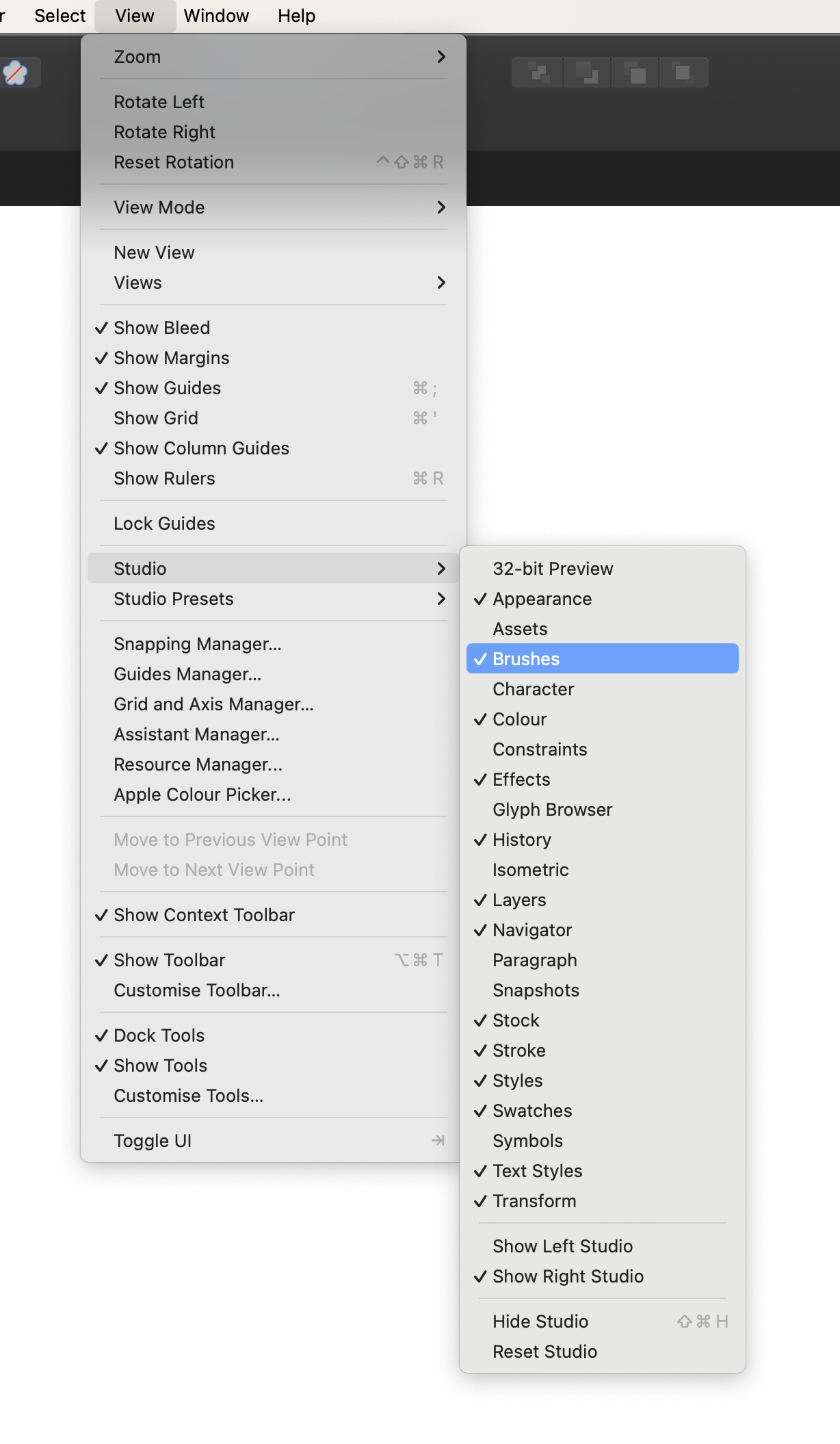
Computer. Step 1
In Affinity Designer open the Brushes panel (Window > Brushes).
Computer. Step 2
Open the drop-down menu in the upper right corner of the Panel.

Computer. Step 3
Select the Import Brushes option on the Menu and browse files on your device:
BA-Halftone-Classic-Dot-Brushes.afbrushes
BA-Halftone-Classic-Line-Brushes.afbrushes
BA-Halftone-Creative-Brushes.afbrushes
BA-Halftone-Invert-Creative-Brushes.afbrushes
BA-Ink-Brushes.afbrushes

Computer. Step 4
Open the Swathces panel (Window > Swatches). Open the drop-down menu in the upper right corner of the Panel.
Select the Import Palette option on the Menu and browse files on your device:
BA Palette 1.afpalette
BA Palette 2.afpalette
BA Palette 3.afpalette
BA Palette 4.afpalette
Package also includes 2 high-resolution paper textures in JPG format.
Tablet. Step 1
In Affinity Designer app open the Brushes panel.
Tablet. Step 2
Open the drop-down menu in the upper right corner of the Panel.
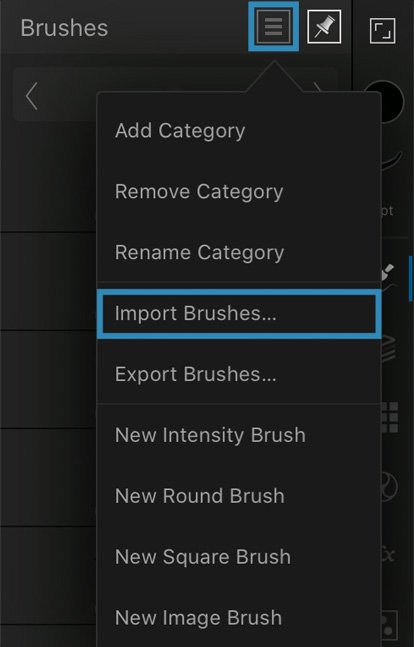

Tablet. Step 3
Select the Import Brushes option on the Menu and browse files on your device:
BA-Halftone-Classic-Dot-Brushes.afbrushes
BA-Halftone-Classic-Line-Brushes.afbrushes
BA-Halftone-Creative-Brushes.afbrushes
BA-Halftone-Invert-Creative-Brushes.afbrushes
BA-Ink-Brushes.afbrushes
Tablet. Step 4
Select the Import Palette option on the Menu and browse files on your device:
BA Palette 1.afpalette
BA Palette 2.afpalette
BA Palette 3.afpalette
BA Palette 4.afpalette
Package also includes 2 high-resolution paper textures in JPG format.